Wednesday, 9 September 2009

The basics of my design

Assuming that this was embedded properly, you should be able to see my presentation.
Designing The Input
View more presentations from jarjee.

Sunday, 30 August 2009

Experiments in programming: Text to image

I've played with the idea of having a data visualiser for a while and decided to see what would happen if I wrote a program to convert text to images. To increase the stakes I decided to design the program around writing an entire book in a .png AND had to be done in a way so it is possible to reverse the process. The image itself ends up looking like static, but the basics for this program are done. Everything that remains is tweaking.

Click here for a better look

The image you see above is the entire work of "The Old Man and the Sea" in a graphical form. True to my word, if you realy want to, you can reverse the process and get the book back.

So how did I do it?

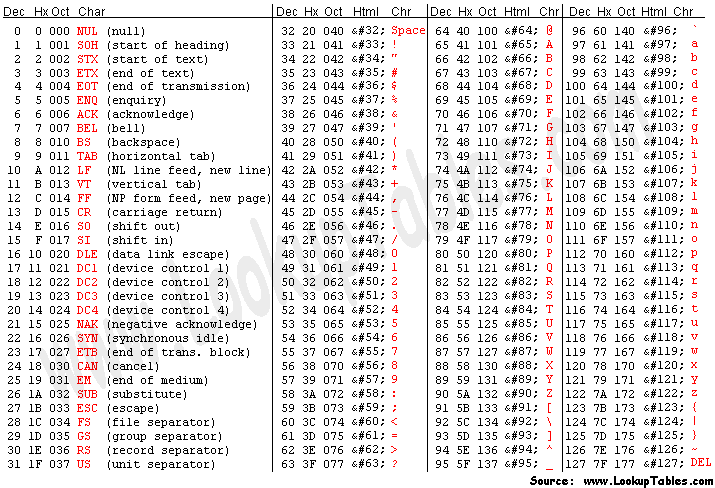
First a bit of back story is required. Ascii was one of the original text formats that was used for the storage of text files in the days of lore. It was great for anything in English but the designers realised that if they wanted to let more languages in, they'd need to change the system. The benefits of Ascii for the early computers was that it was (and still is) extremely small. The secret to this is how the raw data is stored as two hex fields. You can see what I mean HERE.

Hex basically is 0-9 with A-F appended at the end. This means that there are now 16 possible values that can be used at any time and means that it can easily be used with computers because of how it fits into the binary system. (If you can't work this out I fear for your soul)

Since I am inherently lazy, I decided against doing a system that would allow the hex to be used in the colours because it would be harder to tell the differences apart by eye. The only solution then was to split the values into half so that only 16 different colours would be necessary.

The program can now be broken into 2 parts:
1. Convert each character in the text to hex and split into two parts
2. Using the data that was processed, create an image

Because Java is absolutely horrible at text processing, I used python to sort through the text and then spit out the resulting hex codes. The original text is 129 kB in size, while the processed version is 3.79 MB.

For sake of reference, the python program was:
o = open ("list.txt","a")
f = open("old man and the sea.txt").read()
for i in range(0, len(f)):
o.write(hex(ord(f[i]))[2:-1] + "\n")
o.write(hex(ord(f[i]))[3:] + "\n")
print "The number of lines is : " + str(len(f))

To turn this into an image, I needed a bit of kit that easily allows the creation of graphics. Fortunately, I've always wanted to play with Processing which allows me to create diagrams with ease. Processing is based upon Java, so most of the syntax is the same but has its own quirks because it is a language unto itself. I'd seen some neat programs written with it in the past, so I decided that it would be the tool for the graphics.

The current code for this program is:
EDIT: Omitted because of formatting. I'll fix it later.

If you read the code, you'll notice that I mention a ratio for the image. The reason for this is because the number of lines equals the number of pixels in the image. I then brute forced a ratio that would work without having extra pixels. I can enlarge the size of each pixel if I want, but I left it at 1 pixel in size to keep the file size to a minimum.

The colours were decided by just doing a range of 0-240 in the hue of the colour (it goes up by 16 each time). In case you were wondering, the reason why there is so much purple is because appears very often in the file, which is set (currently) to purple.

Future Developments
Automatic resolution adjustments (picks the optimum resolution)
Better control for colours depending on the frequency of the value

If you want to know more on how the processing or python code works, just ask in the comments section.

Wednesday, 26 August 2009

Looking for problems

If you have a look at John's blog, you'll see that databases are the most commonly done out of all computer science projects. This is mainly because it is easyish to do. I'm following the beaten track if you've read my previous post, but I need to focus more on the actual problem.

We as a family have managed to amass a massive amount of books and music cds. It would be better if we could all see what books we have as in the past we have managed to get repeats of books we already have.

My customer is going to be my Dad, who wants to be able to search through his collection of books and musical cd's by genre, author and more. Thus, I need to be able to add, remove, modify and filter data for the database. A possible feature that could be added is a link to Amazon search, to bring up the data automatically when the title is used.

Monday, 24 August 2009

Look Ma, I'm on the internets!

I've dabbled with blogs in the past (eg Xanga) but now actually writing this thing matters. My computer science dossier has to be documented constantly from the birth of the idea to its eventual conception. Currently, I'm planning a database with a twist - it pulls data from Amazon and autocompletes fields for you. It'll be used for albums and books with the possibility of expansion.

As per usual, I've jumped the gun and thought of a neat program that I could write which includes some of what I've learnt in the past. I have some old code that basically follows this structure so the main work is adapting/updating it.
The problem is that my dad has too many CD's and books to sort through and wants a unified way of working out the size of his collection (Eg Database).

I have some idea of how it should work as I typed out some notes beforehand:

Storing Data
Using a text file with strings appended with a unicode character because of string length flexibility. The disadvantages of doing this is that it will be slow for read and write (because it needs to process the lines and then the strings) but the string length justifies this. This is because I don't acutally know how long the titles or other information can get, so its best to future proof the database. Two text files will be used, one for books and the other for music - speeds up the data processing + reduces excess fields. This works out because if it was in one, there would need to be a TYPE field, to differentiate between books and CD's. Data will be written, not appended to make it easier to remove data when requested. This is because there are two main ways to write data, the entire file or at the end. Writing the entire file avoids lots of problems so it is the better solution. No images will be used, the reason for this is because of base64 encoding. Base 64 is when you convert a file to text but it may include the end character that splits the data apart. This will cause errors so its easier to nip it in the bud by not having it at all.

Data Input
This will be handeled by simply entering the data in the database. A possible feature that will hopefully be implemented is pulling data from amazon .com for the author, date, genre and other data. For multiple results - if less than ten results and show the data returned and let the user pick the correct one. If one result returned only, use that data. If more than ten, ask the user to specify their request. When the data is read from the text file it is placed into an arraylist. Doing this means that removing entries will remove the current selection from the arraylist. These modifications will be saved when the entire list is written to disk. Adding new entries will follow a similar process in which the arraylist expands to fit the new data.

User Interface
I will use AWT for the user interface, with text boxes for the input (everything can be modified) with buttons to accept confirmation. A feature that needs to be implemented is searching/filtering and thus will require a textbox to do so.

Thats basically what I've decided for this project in a big nutshell.